
Analytics
Overview
Lion Ads handles analytics as part of the ad lifecycle. When an ad is loaded, shown, closed, rewarded, or generates revenue, the appropriate analytics events are sent automatically by the SDK.
To avoid duplicate events and incorrect reporting, these should not be sent manually from game code.
The diagram below shows the standard analytics flow handled by Lion Ads.
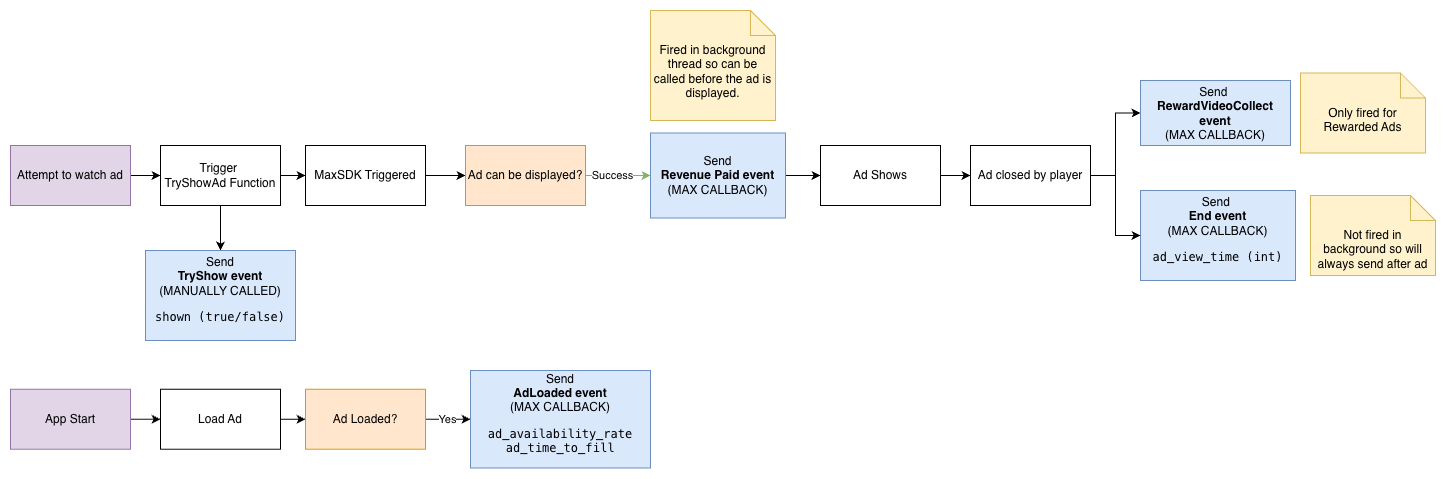
At a high level:
a try show event is sent when an interstitial or rewarded ad is attempted
a load event is sent when an ad finishes loading
a revenue event is sent when ad revenue is reported by MAX
an end event is sent when the ad closes
a reward collect event is sent for rewarded ads only
Additional metrics such as ad availability rate, time to fill, and ad view time are also included where supported.
Events Sent Automatically
Lion Analytics
Lion Ads automatically sends the following Lion Analytics events:
Interstitial
InterstitialTryShow
InterstitialLoad
InterstitialEnd
InterstitialRevenuePaid
Rewarded
RewardVideoTryShow
RewardVideoLoad
RewardVideoEnd
RewardVideoCollect
RewardVideoRevenuePaid
Banner
BannerRevenuePaid
Adjust
Lion Ads automatically sends ad revenue events to Adjust using the MAX revenue callback.
Firebase
Lion Ads automatically sends:
ad_impression
custom_ad_impression
Additional Data
Lion Ads supports passing additional data through ad show calls to enrich the analytics events that are sent automatically.
This is the recommended way to include game-specific context in ad analytics without manually sending separate events.
Any additional data provided through the supported Lion Ads APIs will be included with the relevant automatically generated analytics events where applicable.
Additional Data Included Automatically
Depending on the event, Lion Ads may also attach ad metadata automatically, including:
network
creative ID
revenue
ad unit
shown
ad availability rate
ad time to fill
ad view time
This data is added automatically as part of the SDK flow.
Do Not Log These Manually
When using Lion Ads, developers should not manually log:
Lion Analytics interstitial ad events
Lion Analytics rewarded ad events
Lion Analytics banner revenue events
Adjust ad revenue events for MAX ads
Firebase ad_impression and custom_ad_impression
These are already handled by Lion Ads.
Last updated
Was this helpful?