For the complete documentation index, see llms.txt. This page is also available as Markdown.
Amazon Publisher Services (APS)
Amazon's mobile app ad solution, Amazon Publisher Services (APS), has a dedicated Unity plugin and requires a different installation process than other ad providers.
Installation
Please be sure you have Lion SDK installed in your project.
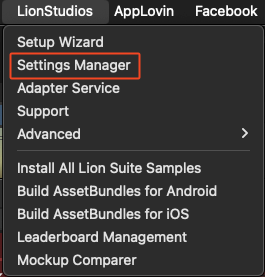
1. Open Lion Studios > Settings Manager on Unity's navigation bar.
Open the Amazon tab at the left navigation bar.
Press the Install button.
Set "Enable auto-initialization" to true.
Installation is complete at this point.
Update Amazon Id's
Ask your studio manager to put Amazon app Id's and Amazon ad Id's for both android & iOS on Portal side.
Run Setup Wizard again by going to LionStudios -> Setup Wizard and complete all steps.
Once you reach "Issues are Detected" step, click on "Fix it" button for "Ads identifier mismatch". All ids will get added automatically at correct locations.
Note: If all Amazon Ad's are already added correctly at this point then following button will not show up and it means that setup is already configured correctly.
Sanity Check:
This step is not required but if you want you can see all Amazon Id's for yourself too.
Go to LionStudios -> Settings Manager -> Amazon. You will see Amazon Android and iOS App IDs there already.
Then go to LionStudios -> Settings Manager -> Ads. You will see Amazon Android and iOS Ad Ids there.
Be sure you other Ad Unit IDs are filled and keep "Enable Lion Ads" on. See more information here Ads.