
IAP Validation
Introduction
Cheaters and invalid IAP transactions can cause Adjust & Looker dashboards to display inaccurate values and the UA networks to train their algorithms on bad data. This can lead to the contamination of UA algorithms' decision-making process and incorrect game design choices.
LionSDK offers static methods for IAP receipt validation to help reduce or eliminate the negative impacts of cheaters’ IAP transactions.
What does the package do?
When configured correctly:
Fires an
inapp_purchaseevent to the backend for every purchase.Includes a
ValidationStatusfield indicating whether the purchase is valid.
Fires a network-specific revenue event
iap_purchasefor Adjust, depending on the validation result.
Requirements
LionSDK package installed.
Unity In-App Purchasing package installed and configured (5.x.x supported).
Unity IAP 4.x.x support will be deprecated in future. If support is required, refer to the sample code provided in our Lion IAP Validation package.
For external validators (i.e Adjust or Nakama), additional setup is required. This setup is explained on their own page, as explained in the next section.
Selecting the desired Validator in Lion Settings.
Validators
The selected Validator in the Lion Settings determines the behaviour of the system:
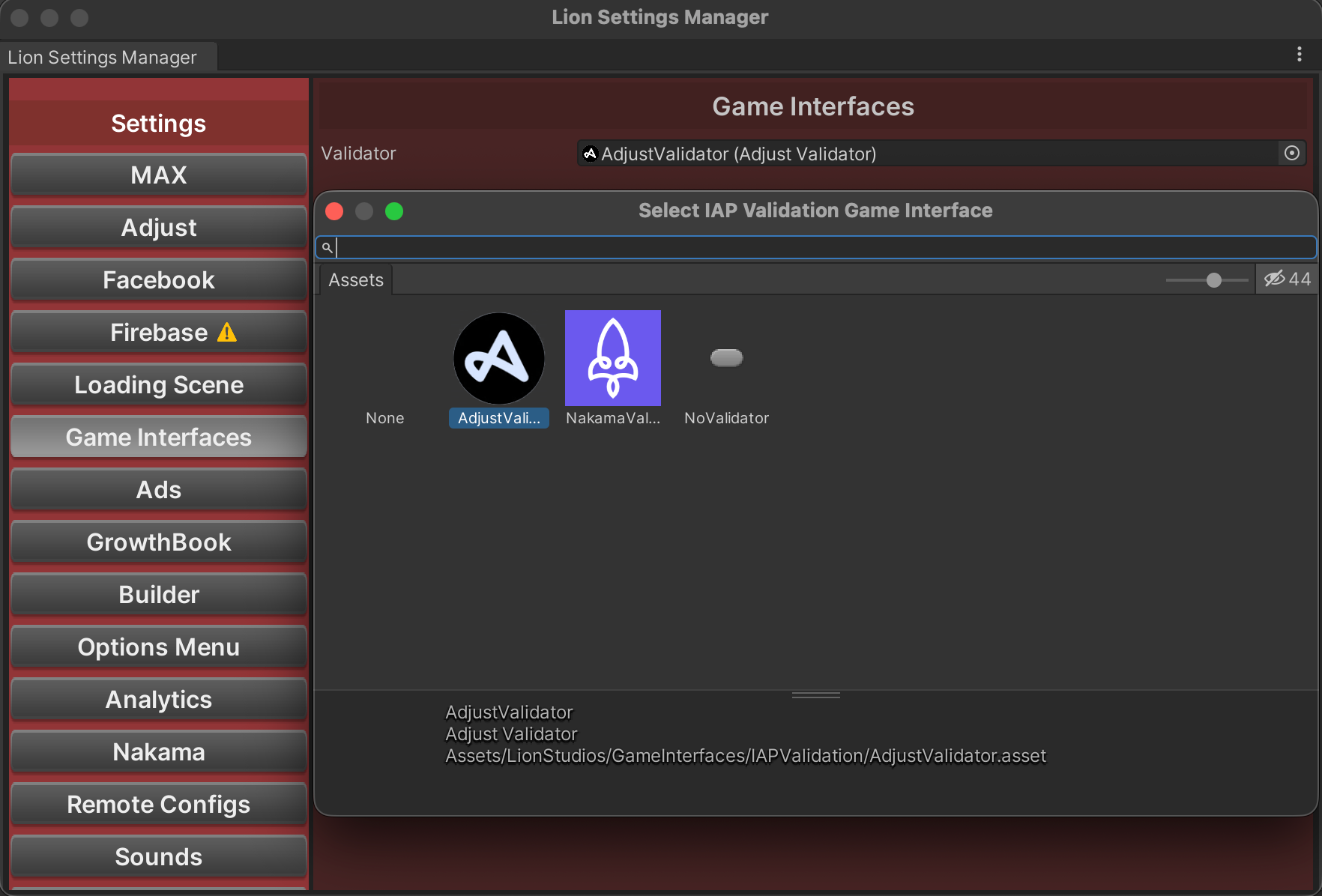
Adjust Validator Uses Adjust purchase verification APIs to validate receipts and fires Adjust revenue events for valid purchases.
Nakama Validator Uses nakama purchase verification APIs to validate receipts and fires Adjust event events for valid purchases.
Nakama Validator only support Unity IAP 4.x.x package version.
The Nakama validator will be removed in the future, with validation being moved to the Adjust Validator as the main Validator.
No Validator Performs no real validation; always treats purchases as “not verified” while still allowing your game to send IAP events.
Remove Events (if applicable)
LionSDK will automatically fire the required Adjust and Analytics IAP events. In your Unity Project, you should remove these events from your game code to prevent duplication and over reporting of revenue:
Remove any existing Adjust IAP-related events (iap_purchase,
purchase_failed,purchase_unknownandpurchase_notverified)Remove any existing calls to
LionAnalytics.InAppPurchase()event method
Failure to remove any manual IAP event calls will lead to issues in IAP revenue reporting and tracking. Lion IAP Validation will handle all required event calls on its own.
Implementation
Unity IAP 5.x.x Implementation
Unity IAP 5.x.x introduces a new purchase flow based on Orders, replacing the old ProcessPurchase(PurchaseEventArgs) callback. Because of this, receipt and product metadata are no longer stored in a single structure.
Instead:
Some fields come from the Order (receipt-level data).
Some fields come from the Product (catalogue metadata defined in Unity IAP). You must combine both to build a single
IAPInfoobject for validation.
Call IAPValidation.ValidateAndLog()
If you use Unity Purchasing 5.x.x, you typically call IAPValidation.ValidateAndLog() inside your OnPurchaseConfirmed callback. This sends your combined receipt and product metadata to the validation backend and logs the results to LionAnalytics.
Parameters:
IAPInfoiapInfo: This structure is used by the IAP Validation system to send all required purchase fields to the validator. Because Unity IAP 5.x.x separates the receipt data (inOrder) and product metadata (inProduct), You must build a singleIAPInfoobject by combining values from both structures.Order order: This is theUnityEngine.Purchasing.Orderobject that Unity Purchasing provides in theOnPurchaseConfirmedcallback. Fromorder.Info, you extract:transactionID→order.Info.TransactionIDreceipt→order.Info.Receipt
Product product: Unity IAP 5.x.x does not pass Product metadata directly through the purchase callback. You must look up the product using:var unityProduct = _storeController.GetProductById(pInfo.productId);The following parameters are required to construct an
IAPInfoinstance:transactionIDproductIDreceiptisoCurrencyCodelocalizedPricelocalizedTitleproductType
IAPGameplayInfoiapGameplayInfo: This object contains information required by LionAnalytics, including details about the in-game rewards. These include:List<Item>ReceivedItemsList<VirtualCurrency>ReceivedCurrenciesStringPurchaseLocation
ActiononSuccess(optional): This callback, if provided, will be raised if the receipt is valid.ActiononFailure(optional): This callback, if provided, will be raised if the receipt has not been validated. TheValidationStatuswill provide the reason for the failure to validate.Dictionary<string, object>additionalData(optional): This info will be stamped on to the Lion Analytics InAppPurchase and LionDebug events that get fired after validation is complete.
Examples:
Simple inline call:
using LionStudios.Suite.Purchasing;
using UnityEngine.Purchasing;

private void OnPurchaseConfirmed(Order order)
{
    var info = order.Info;
    foreach (var pInfo in info.PurchasedProductInfo)
    {
        var unityProduct = _storeController.GetProductById(pInfo.productId);

        var iapInfo = new IAPInfo(
            info.TransactionID,
            unityProduct.definition.id,
            info.Receipt,
            unityProduct.metadata.isoCurrencyCode,
            (double)unityProduct.metadata.localizedPrice,
            unityProduct.metadata.localizedTitle,
            unityProduct.definition.type
        );

        var gameplayInfo = new IAPGameplayInfo(
            new List<Item>()
            {
                new Item("NoAds", 1),
                new Item("SpecialWeapon", 1),
                new Item("BonusCards", 10)
            },
            new List<VirtualCurrency>()
            {
                new VirtualCurrency("coins", "normal", 10000),
                new VirtualCurrency("gems", "special", 10)
            },
            "shop"
        );

        IAPValidation.ValidateAndLog(iapInfo, gameplayInfo);
    }
}
Inline call with additional data:
using LionStudios.Suite.Purchasing;
using UnityEngine.Purchasing;

private void OnPurchaseConfirmed(Order order)
{
    var info = order.Info;
    foreach (var pInfo in info.PurchasedProductInfo)
    {
        var unityProduct = _storeController.GetProductById(pInfo.productId);

        var iapInfo = new IAPInfo(
            info.TransactionID,
            unityProduct.definition.id,
            info.Receipt,
            unityProduct.metadata.isoCurrencyCode,
            (double)unityProduct.metadata.localizedPrice,
            unityProduct.metadata.localizedTitle,
            unityProduct.definition.type
        );

        var gameplayInfo = new IAPGameplayInfo(
            new List<Item>()
            {
                new Item("NoAds", 1),
                new Item("SpecialWeapon", 1),
                new Item("BonusCards", 10)
            },
            new List<VirtualCurrency>()
            {
                new VirtualCurrency("coins", "normal", 10000),
                new VirtualCurrency("gems", "special", 10)
            },
            "shop"
        );

        IAPValidation.ValidateAndLog(
            iapInfo,
            gameplayInfo,
            additionalData: new Dictionary<string, object>()
            {
                { "PlayerRank", GameManager.PlayerRank },
                { "Difficulty", GameManager.Difficulty }
            });
    }
}
Full OnPurchaseConfirmed Example (Unity IAP 5.x.x)
using LionStudios.Suite.Purchasing;
using UnityEngine.Purchasing;

private void OnPurchaseConfirmed(Order order)
{
    var info = order.Info;
    foreach (var pInfo in info.PurchasedProductInfo)
    {
        string productId = pInfo.productId;
        Product unityProduct = _storeController.GetProductById(productId);
        IAPGameplayInfo gameplayInfo;
        switch (productId)
        {
            case "com.company.game.noads":
                gameplayInfo = new IAPGameplayInfo(
                    new List<Item>() { new Item("NoAds", 1) },
                    new List<VirtualCurrency>(),
                    "ingame"
                );
                break;
            case "com.company.game.noadsspecial":
                gameplayInfo = new IAPGameplayInfo(
                    new List<Item>() { new Item("NoAds", 1) },
                    new List<VirtualCurrency>() { new VirtualCurrency("coins", "normal", 1000) },
                    "specialpopup"
                );
                break;
            case "com.company.game.coinpack1":
                gameplayInfo = new IAPGameplayInfo(
                    new List<Item>(),
                    new List<VirtualCurrency>() { new VirtualCurrency("coins", "normal", 1000) },
                    "iapshop"
                );
                break;
            case "com.company.game.coinpack2":
                gameplayInfo = new IAPGameplayInfo(
                    new List<Item>(),
                    new List<VirtualCurrency>() { new VirtualCurrency("coins", "normal", 5000) },
                    "iapshop"
                );
                break;
            default:
                gameplayInfo = new IAPGameplayInfo(null, null, "unknown");
                break;
        }

        var iapInfo = new IAPInfo(
            info.TransactionID,
            unityProduct.definition.id,
            info.Receipt,
            unityProduct.metadata.isoCurrencyCode,
            (double)unityProduct.metadata.localizedPrice,
            unityProduct.metadata.localizedTitle,
            unityProduct.definition.type
        );

        IAPValidation.ValidateAndLog(iapInfo, gameplayInfo);
        // Your code to reward the player
    }
}
Conditional reward
In some rare cases, you’ll want to reward the player only if the receipt is valid. This is not normal behaviour and should be reserved for multiplayer games where cheaters can harm the experience of other players.
In this case, you can do as shown in the example below
using LionStudios.Suite.Purchasing;

private void OnPurchaseConfirmed(Order order)
{
    var info = order.Info;
    foreach (var pInfo in info.PurchasedProductInfo)
    {
        var unityProduct = _storeController.GetProductById(pInfo.productId);

        var iapInfo = new IAPInfo(
            info.TransactionID,
            unityProduct.definition.id,
            info.Receipt,
            unityProduct.metadata.isoCurrencyCode,
            (double)unityProduct.metadata.localizedPrice,
            unityProduct.metadata.localizedTitle,
            unityProduct.definition.type
        );

        var gameplayInfo = GetGameplayInfoForProduct(unityProduct.definition.id);

        IAPValidation.ValidateAndLog(
            iapInfo,
            gameplayInfo,
            onSuccess: () => GiveReward(unityProduct.definition.id),
            onFailure: DisplayError
        );
    }
}
private void GiveReward(string productId)
{
    // Your reward logic
}
private void DisplayError(ValidationStatus status)
{
    // Show message to player/log error
}
Validation
If the package is implemented correctly, for each purchase, two events will be fired:
inapp_purchase: a LionAnalytics event used for analytics on Looker.iap_purchase: a native Adjust event used by Adjust for revenue metrics.
Make sure that these events are received by following either of the paths below:
If you have access to Looker, for each relevant event, check the following:
The event name appears [ref]
If you do not have access to Looker, please use the LionAnalytics QA Tool following the instructions here: Event Validation
.png?alt=media)
In Looker,inapp_purchase events have a ValidationStatus parameter that can be:
Success: The receipt is valid.Failure: The receipt is invalid. Probably a cheater.Error: Something went wrong when trying to validate the receipt, so we can’t determine d if the receipt is valid.
TroubleShooting
Many (or all) transactions showing
Error validating IAP/Failurein Looker.Explanation: This kind of failure indicates an error communicating with Google, leading to a
Failurestatus and a validation message,Error validating IAP.Cause: All games published in Lion Studios Google Play account(s) should already have the correct API Service Account credentials in place for all games, so while this is the most common cause for the error, it is not common for our games.
The cause we see most often is a bug in Google Play that occurs when your IAP bundles are created before linking your API Service Account on Google Play Console. Google assumes you first linked your API Service account, then added your various IAP packages. If you did this out of order, Google won’t recognize your existing IAP bundles.
Resolution: Go to your IAP bundle in your Google Play Console and edit some details such as
descriptionof the IAP, and save it again. We usually add aspace, save changes, then remove the addedspaceand save again. Any change made to the IAP bundle will trigger Google to reread the IAP bundles, and should fix the bug so these bogus failures go away.
FAQ
I’m seeing the error:
Library\\PackageCache\\com.lionstudios.beta.iap@0.1.0-b9\\Runtime\\IAPValidation.cs(128,25): error CS0103: The name ‘STORE NAME’ does not exist in the current contextPlease switch Unity Build Settings to iOS or Android platform.
Last updated
Was this helpful?