
PTS Public Methods
Complete reference for all public methods and properties in the Popup Tracking System.
Critical Public Properties
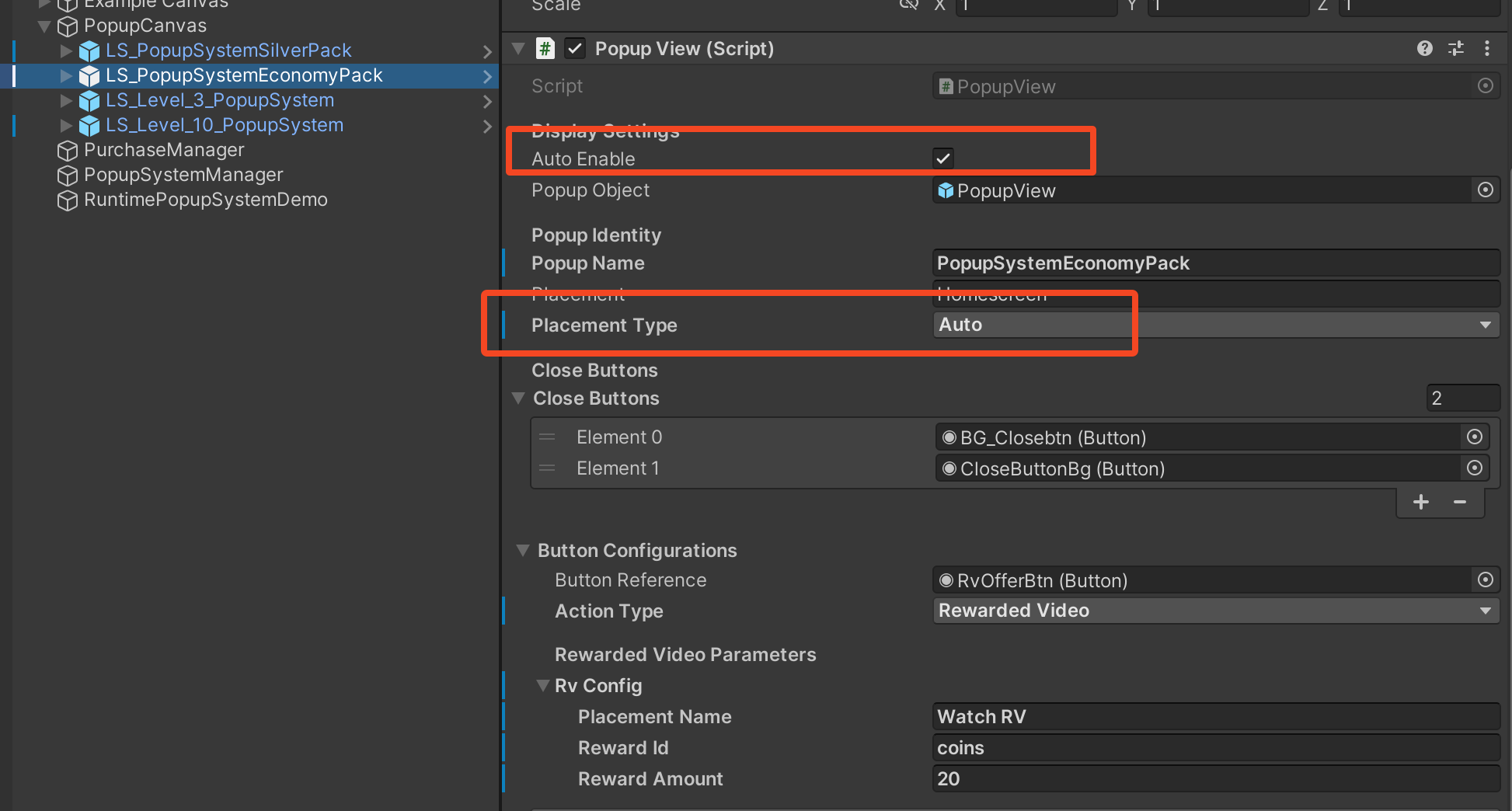
AutoEnable (Read-only)
What is AutoEnable?
AutoEnableis a boolean property onPopupViewthat controls who manages GameObject visibility when showing/hiding popups.
Case 1 : Auto Enable =
TRUE(Default - Recommended)The system handles everything automatically.
_popup.Show(); // ✅ Analytics fired + Popup GameObject shown
_popup.Hide(); // ✅ Popup GameObject hiddenPopupView Public Methods
Case 2 : Auto Enable =
FALSE(Advanced Only)Only use this if you have a specific technical reason to manually control GameObject visibility separate from analytics tracking.
_popup.Show();                      // ✅ Analytics fired
                                    // ❌ GameObject NOT shown

_popup.gameObject.SetActive(true);  // ✅ devs show it manually
//......Other Code
_popup.gameObject.SetActive(false); // ✅ devs close gameobject manually
PlacementType
What is PlacementType(PopupTriggerType) ?
It identifies how a popup was shown to the user. This is purely for analytics tracking - it doesn't affect functionality, only how data is reported.
Auto : Popup appears automatically based on game logic without direct player action.
Floating : Player explicitly clicks a button or icon to open the popup.
Show() :
Shows the popup, fires the ProductViewed() analytics events, and increments popup counter.
[SerializeField] private PopupView _levelCompletePopup;

public void OnLevelComplete()
{
    _levelCompletePopup.Show();
}
What happens:
Initializes popup data and buttons
Shows popup (if Auto Enable = true)
Increments popup counter
Fires
ProductViewedanalytics for each offer
Hide() :
Hides the popup
public void ClosePopup()
{
    _levelCompletePopup.Hide();
}
Note: This only hides if Auto Enable = true. Otherwise, you manage visibility manually.
SetRuntimeConfig(PopupViewConfig config) :
Changes popup identity at runtime. Perfect for remote config or A/B testing.
// From remote config
PopupViewConfig remoteConfig = new PopupViewConfig
{
    PopupName = "special_offer_variant_a",
    Placement = "level_10_milestone",
    PlacementType = PopupTriggerType.Auto
};

_popup.SetRuntimeConfig(remoteConfig);
_popup.Show();
When to use:
Loading popup config from remote config
A/B testing different popup names/placements
Dynamic placement names based on player progression
Important: Call BEFORE Show() to take effect.
AddButtonConfig(PopupButtonConfig config) :
Adds an offer to the popup at runtime.
// Create new IAP offer at runtime
PopupButtonConfig newOffer = new PopupButtonConfig
{
    ButtonReference = myIAPButton,
    ActionType = PopupActionType.Iap,
    IapConfig = new IAPActionConfig
    {
        ProductId = "com.game.dynamicoffer",
        ProductName = "Flash Sale",
        TransactionKey = "TransactionID"
    }
};

_popup.AddButtonConfig(newOffer);
_popup.Show();
When to use:
Adding offers based on player progression
Flash sales or time-limited offers
Dynamic offer generation from server
SetButtonConfig(int index, PopupButtonConfig config)
Updates an existing offer at specific index. Used for runtime configuration of offers.
// Change first offer's product ID
PopupButtonConfig updatedConfig = new PopupButtonConfig
{
    ButtonReference = button1,
    ActionType = PopupActionType.Iap,
    IapConfig = new IAPActionConfig
    {
        ProductId = "com.game.newoffer",  // Changed!
        ProductName = "Updated Offer",
        TransactionKey = "TransactionID"
    }
};

_popup.SetButtonConfig(0, updatedConfig);
Note: Only fill the config matching your ActionType. As shown in above example.
When to use:
Updating offers based on remote config
Swapping products for A/B tests
Changing rewards dynamically
RemoveButtonConfig(int index)
Removes an offer at specific index.
// Remove second offer
_popup.RemoveButtonConfig(1);
ClearButtonConfigs()
Removes all offers from popup.
// Clear all offers before adding new ones
_popup.ClearButtonConfigs();

// Add new offers
_popup.AddButtonConfig(offer1);
_popup.AddButtonConfig(offer2);
When to use:
Before configuring popup from scratch at runtime
Resetting popup for different variations
GetButtonConfigCount()
Returns number of offers currently configured.
int offerCount = _popup.GetButtonConfigCount();
Debug.Log($"Popup has {offerCount} offers");
Last updated
Was this helpful?