
Popup Tracking System
Introduction
The Popup Tracking System helps easily track and analyze how players interact with various popup screens across the game — whether they are paid offers, rewarded videos, or free in-game prompts.
What does the package do?
It standardizes event tracking into a simple, unified funnel that allows accurate measurement of popup performance and conversion, simple system that records:
When a popup appears
How users interact with it
When an offer completes (like a purchase or ad watch)
Integration Steps
Follow these simple steps to use PTS in your own project:
1. Install the package
You can install the Lion - Popup Tracking System package from the Unity package manager.
This package has not been released publicly yet, so use the URL http://internal.packages.lionstudios.cc:4873 instead of http://packages.lionstudios.cc:4873 in order to see it.
After installing package import sample scene for Popup Tracking System from package manager which shows some example on how to use this module.
Sample Scene Location :
Assets/Samples/Lion - PopupTrackingSystem/[version]/PopupTrackingExample/DemoScene
Default Prefab Location :
Packages → Lion - PopupTrackingSystem → Runtime → Prefab → LS_PopupSystem
2. Create Popups Using PopupView
Create Popup From Scratch
As per your Game Design Setup UI and hierarchy
Add PopupView to Root GameObject
3. Configure Offers and other Properties in Inspector
In
PopupViewcomponent → Button Configurations:Click + to add offer
Assign Button Reference (drag and drop gameobject which has button component)
Select
ActionType(OfferType) : (IAP, RewardedVideo, Economy)IAP: Product ID, Product Name
RV: Placement Name, Reward ID, Reward Amount
Economy: Reward/Spend Item IDs and Amounts
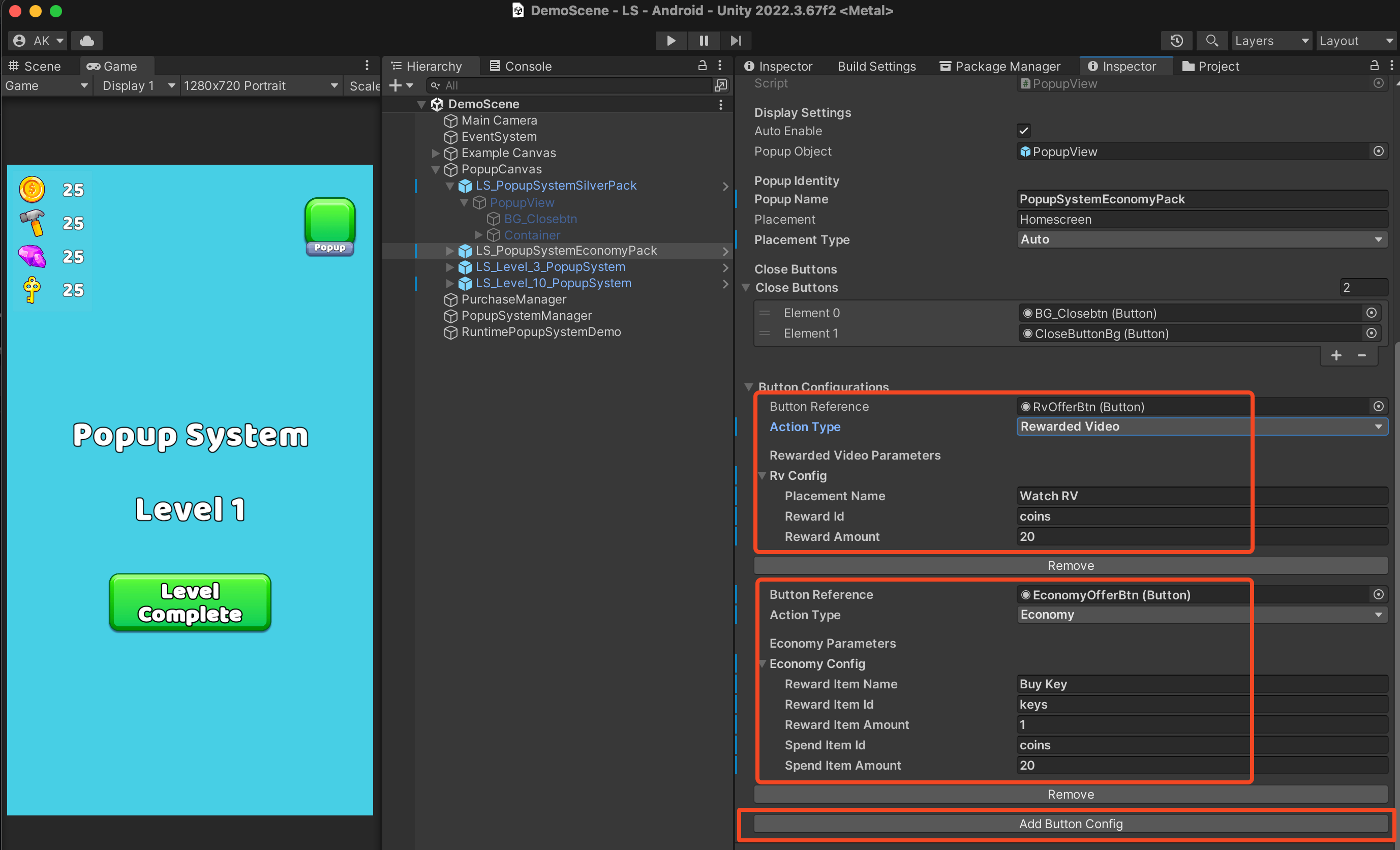
💡 Tip: In-order to see how PopupTrackingSystem module setup behaves open and play the sample scene.
You can use our prefabs or make your own custom popup design — just attach our scripts.
LionGameInterface Integration
Make sure LionGameInterface is implemented. This interface handles the communication for purchases, ads, and in-game economy.
Why Is This Required?
The Popup Tracking System needs to communicate with your game's:
Economy system (to give/take currency)
IAP system (to process purchases)
Ad system (to show rewarded videos)
Required Interfaces
You must implement three interfaces:
ILionTransactionsInterface- Handles in-game currencyILionPurchasesInterface- Handles real-money purchasesILionAdsInterface- Handles rewarded video ads
Refer to the Lion Game Interface Integration Guide for details.
Example: The IAP offer uses LionGameInterface callbacks to handle purchases and fire achievement events when completed.
Interfaces must be registered BEFORE any popup is shown.
Sample Video
Last updated
Was this helpful?